Friday, January 18, 2013


Dolphin Browser v9.2.0 Build 197

Image

Requirements: 2.0.1 and up
Overview: Simplify your mobile life. Let Dolphin do all the work so you don’t have to.


Dolphin Browser is the world's first Gesture, Sonar and Add-on enabled mobile web browser on Android.] Download Dolphin's free mobile browser and join the 50 million who enjoy the exclusive features of our mobile web browser.

★ #1 Mobile Web Browser on Android Market
★ Over 50,000,000 downloads
★★★★★ Dolphin Browser's Gestures and sidebars make Web surfing fast, intuitive and fun while on the go. - USA Today
★★★★★ “…it’s a great, simple browser that feels more at home on a touchscreen device than pretty much anything else you’ll try. - Lifehacker

Features:
★ One-tap Share - Right from Dolphin, you can tweet web pages, post them to Facebook, share them via email, or grab the content and save it directly to Evernote (Beta) or Box.
★ Tabbed browsing - No need to toggle between screens, tabbed browsing lets you open and switch between Web pages fast as lightning.
★ Dolphin Connect - Sync/Send between Mobile and Desktop
1. Send to device: Send links, maps, phone numbers, & more from your desktop to your phone and vice versa with Chrome/Firefox/Safari extensions.**
2. Dolphin Connect: Sync easily your history, bookmarks, passwords and open tabs across Android, iOS and desktop.
★ WiFi - Broadcast - Share links with Dolphin friends nearby on your wifi network.
★ Sonar - Dolphin listens and lets you use your voice to search on the Internet, share on your favorite social networks, bookmark your favorite website, navigate and more all from your phone or tablet browser
★ Gesture - Let your inner artist out and create a personal Gesture (symbol) to access the mobile and desktop websites you use the most.
★ Add-on – Beef up your mobile Internet browser experience by installing the Add-ons for the tasks you need at your fingertips. With more than 60 and counting, Dolphin Add-ons enables any action to be done right within the mobile browser. You can check out the Add-on features with 3 preloaded on your right Sidebar.
★ Speed Dial - Visit your favorite mobile websites on the go with one touch.


Download Instructions:
http://ul.to/h69p51zs

MX Video Player Pro v1.6d Rev.1 Fixed

Requirements: Android version 2.1 and higher, supports App2SD
Overview: MX Video Player - The best way to enjoy your movies.

Image

<Key Features>

a) MULTI-CORE DECODING - MX Video Player is the first Android video player that performs multi-core decoding. According to the test results on dual-core devices, it shows up to 70% performance improvement than single-core devices.

b) CPU OPTIMIZATION - Provides highly optimized Codecs and Rendering Engines for the processors including ARM® NEON™ and NVIDIA® Tegra™ 2.

c) PINCH ZOOM - Easily zoom in and out by pinching and swiping across screen.

d) SUBTITLE SCROLL - Scroll on subtitle text and playback position will be adjusted to match previous or next subtitle timing.

e) BETTER SUBTITLE READABILITY - Increased subtitle readability with thicker border and shadow around text.

f) ANDROID 4.0 - Fully supports Android 4.0 Ice Cream Sandwich.


<Subtitle Formats>

- DVD, DVB, SSA/ASS Subtitle Tracks.
- Sub Station Alpha(.ssa/.ass) with full styling.
- SAMI(.smi/.sami) with ruby tag support.
- SubRip(.srt)
- MicroDVD(.sub/.txt)
- SubViewer2.0(.sub)
- MPL2(.mpl/.txt)
- PowerDivX(.psb/.txt)
- TMPlayer(.txt)


Download Instructions:
MX Player Pro 1.6d Rev.1 (NEON):
http://www.MegaShare.com/4173940

MX Player Pro 1.6d Rev.1:
http://www.MegaShare.com/4165462

ARMv7+NEON Codec 1.6d Rev.1
Codec for ARMv7+NEON type CPU.
http://www.MegaShare.com/4165529

ARMv7 (Tegra2) Codec 1.6d Rev.1
Codec for ARMv7 type CPU, mostly useful for NVIDIA® Tegra™ 2.
For devices including Motolora Atrix, Galaxy Tab 10.1, LG Optimus 2X, Motorola XOOM, ASUS Transformer TF101, Acer Iconia Tab A500, etc.
http://www.MegaShare.com/4165473

ARMv6+VFP Codec 1.6d Rev.1
Codec for ARMv6+VFP type CPU.
For devices including Samsung Galaxy A, HTC Legend, etc.
http://www.MegaShare.com/4165482

ARMv6 Codec 1.6d Rev.1
Codec for ARMv6 type CPU.
http://www.MegaShare.com/4165504

ARMv5 Codec 1.6d Rev.1
Codec for ARMv5 type CPU.
http://www.MegaShare.com/4165517

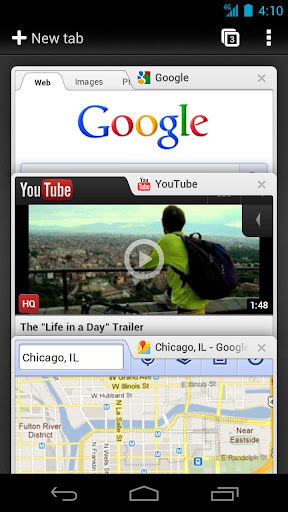
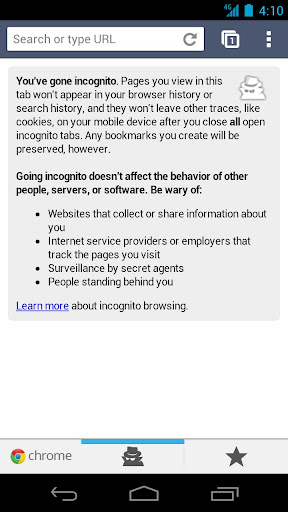
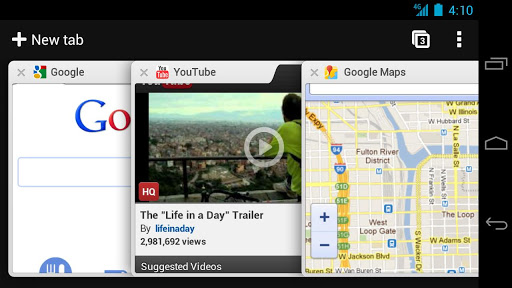
Chrome Beta v25.0.1364.37

Image
ImageImage
Image

Download Instructions:
http://ul.to/4auvy8ts

Google Maps v6.3.0 Ownhere Mod

Requirements: for all Android versions

Image

Overview:
Get Google Maps with Navigation (Beta), Places, and Latitude


*Navigation: Free, voice-guided GPS navigation system
*Places: Find, rate, and get recommendations for places
*Latitude: See friends on the map and check in at places

Google Maps v6.3.0 Mod - With World Navigation activated
This map is for the country that cant use navigation on google map. It has been hacked and can be used by any country now.

Features:
worldwide navigation using Google Maps Directions
map tiles caching on SD card
force-enable MT. If you're on Eclair or some custom Donut and don't have multitouch zooming, then maybe this will enable it.
force-enable Buzz feature
fix for map shift issue in China
option to hide zoom buttons
installable on non-rooted devices
Thanks to Ownhere

Download Instructions:
http://ul.to/87jossnv

Mirrors :
http://extabit.com/file/27b59lf655x1i
http://depositfiles.com/files/cotbuzcu4

Signed :
http://ul.to/oib4nv0h

Mirrors :
http://extabit.com/file/27b59lf60srpy
http://depositfiles.com/files/s425a62hv

Nonrooted :
http://ul.to/lxlo4tjz

Mirrors :
http://extabit.com/file/27b59lf655tye
http://depositfiles.com/files/qol60sfyw

Quickoffice Pro HD for Tablets v5.7.327


Image

Requirements: 3.0 and up

Overview:
                Work smarter from anywhere with Quickoffice Pro HD on your Android tablet. This all-in-one solution lets you get real work done online and offline, like editing Microsoft® Office documents, spreadsheets, and presentations, as well as annotating PDF files. You’ll also be able to access Google Drive or other cloud storage accounts, manage your email attachments, and access locally saved files.

What’s new in version 5.7?
---------------
✔ Freeze and unfreeze panes in Quicksheet
✔ Quickword now supports multi-column layouts
✔ Add shadows and reflections in Quickpoint
✔ Slide animations and transitions in Quickpoint
✔ Carousel view of files in file manager
✔ Access and share files using Egnyte


Download Instructions:
http://ul.to/3ixqi384
http://www.secureupload.eu/aa8oirbwgrru

[root] Triangle Away v2.55

Requirements: 4.0 and up


Image

Overview:
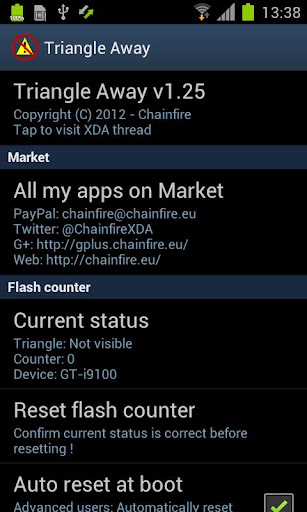
             Many Samsung devices store a flash counter that keeps track of how many times you have flashed *custom* firmwares to your device. On some devices, a yellow triangle or other sort of visual warning is also displayed during boot if you are running a *custom* firmware. TriangleAway was built do disable the triangle (if a visual warning is present) and reset the custom ROM flash counter to 0. This app requires root !
 

You can find out the current status of your flash counter and firmware state (custom or official) by booting into "download mode" on most devices. The usual way of getting into "download mode" is by first turning off your device, then turning it on by pressing and holding volumedown+home+power. Alternatively, the "adb reboot download" command also often works.

When you run TriangleAway, if your device and firmware are supported, it will show you the detected state of the binary (custom or official) and flash counter value, and the option to "Reset flash counter". Please confirm that the information shown is correct before resetting the values.

On a number of devices, TriangleAway can work, but your firmware may not be supported directly. In that case, the app will tell you it needs to reboot into a special boot mode, which will be happen if you select "Reset flash counter". The device will reboot into a special mode which will allow you to review the current status and reset the binary and flash counter values (or abort and do nothing).

!!! THIS IS A DANGEROUS OPERATION AND COULD POTENTIALLY BRICK YOUR DEVICE. PROCEED AT YOUR OWN RISK. A USB JIG IS PREFERRED IF YOU HAVE A WORKING ONE !!!
( and by brick I mean brick - only a board replacement or a JTAG unit will be able to save you, don't mess with boot(loader) stuff unless you *really* mean it! )

Note#1: using Triangle Away may unmount your SD card. Reboot or manually remount it from Android settings.

Note#2: on the SGS3, the "system modified" status can only be reset on some firmwares.

This app has been used successfully on:

Samsung Galaxy S2:
- GT-I9100 **

Samsung Galaxy Note:
- GT-N7000 **
- GT-I9220 **

Samsung Galaxy S3:
- GT-I9300 **
- GT-I9300T **
- AT&T
- Sprint
- T-Mobile
- Verizon
- Canadia
- US Cellular
- GT-I9305 LTE **
- GT-I9305T LTE **
- GT-I9305N LTE **
- Korea SHV-E210K/L/S **
- Korea SHW-M440S **

Samsung Galaxy Note 2:
- GT-N7100/T **
- GT-N7105/T LTE **
- SPH-L900 Sprint **
- SGH-T889 T-Mobile **
- SGH-R950 US Cellular **
- SGH-I317/M AT&T/Canada **
- SCH-I605 Verizon ** (unlocked bootloader only)
- Korea SHV-E250K/L/S **

Samsung Galaxy Camera EK-GC100 **

Samsung Galaxy Note 10.1":
- GT-N8000 3G **
- GT-N801x Wi-Fi **
- GT-N8020 LTE **
- SHW-M480S/K/W **

Samsung Galaxy Tab 2:
- GT-P310x 7" 3G
- GT-P311x 7" Wi-Fi
- GT-P510x 10.1" 3G
- GT-P511x 10.1" Wi-Fi

** Various related models are supported depending on firmware, but only the exact model numbers listed are supported regardless of firmware version.

Whether or not Triangle Away works depends largely on your kernel. Flashing a different kernel may make it work if it previously didn't.

Variants that are NOT based on Exynos processors but rather on Qualcomm or Nvidia processors are NOT expected to work. I honestly would NOT try (until further notice) - examples are the Skyrocket and AT&T Note.

For discussion and technical details, see the XDA-Developers.com thread here:

http://forum.xda-developers.com/showthr ... ?t=1494114

Note that this download is also available from that thread completely for free. You can go there and download it for free, or buy me a beer and download it from Market. It is 100% the exact same program.

What's in this version:
- Added option to re-enable tracker after counter reset disabled it, works for some to restore system "normal" status temporarily(!)
- Fixed issue with the modified system status workaround, that root would never come back. If you're suffering from this problem, try keeping your phone fully on for 10 minutes or more, then root will return. Run Triangle Away again afterwards.

This app has NO advertisements


Download Instructions:
http://ul.to/stfmhrzi

Super Manager 3.0 v3.1.5

Image

Requirements:Android 1.5+

Overview: This is a powerful system utility for Android, more than 20 utility !!


This is a powerful system utility for Android, more than 20 utility !!

You can install the software to replace the well-known software, such as: the EXPLORER ROOT, Titanium Backup, Task Manager, and APP Lock, the Schedule, ..., etc.

• If you want to use the beta version, you can follow us in our Facebook, http://www.facebook.com/gpcsoft
• If you install more than 3 products of GPCSOFT(Super Dial, Account Book, Password Protector), Super Manager will turn into Promotion Edition automatically.
• You can download the user manual (PDF file) in our website. http://gpc.myweb.hinet.net/supermanager_manual.pdf
• This is free edition, you can also install more than 3 of 4 GPCSOFT products(Super Dial, Account Book, Password Protector, Ease Sleep) upgrade to Promotion edition to gain more features.
• If you like it, you can buy the donation edition from Android Market now.(see "View more applications" below).

File Explorer: a transitional File Explorer with file operation.
File Explorer(ROOT): it is also a ROOT Explorer if you rooted your device first. Integrated with FTP, SMB, CIFS, File Encrypt(Paid only)
Task Manager: View the process memory usage and memory clean up
Auto Memory Clean Up: Free the unnecessary process to enhance the performance. You can do it manually, screen off and memory gap (When the free memory size is low than the value you set)
APK Manager: A powerful APK utility, you can remove, view, backup installed APK, APK Mover, APK Freeze ,Default Clear,
Startup Manager: Manage the APK running on system boot-up
APP Protector: Lock your customize apps with your password
Super Launcher: Device Information, Quick Launch, Switcher, Shortcut, Tethering Switch,Power Current Logger, Mobile Internet Switch
Super Launcher(ROOT):Screen Capture, Quick Reboot
Auto Schedule: the intelligent and integrate features for "sleep switch" software.
Screen Tool:"Screen Adjuster","Screen RGB Test","Night Reading Mode"
Signal Booster: refresh the connection between phone and cellar station to improve the signal strength.
AD Free (ROOT)


Download Instructions:
http://datacloud.to/download/db664b30/sydg7fiud-rar
http://ul.to/s3p69k75

GO Launcher EX v3.27 beta1

Requirements:1.6+

Image

Overview:
             GO Launcher EX is the extended version of GO Launcher, one of the most popular home apps in Android Market. It’s a highly customizable home replacement application, which will run when you press your android phone’s HOME key. GO Launcher EX supports hundreds of themes, fast flip speed and tons of useful functions.


GO Launcher EX v3.27.


Change-log:

1.(New) Multiple wallpaper updates to v1.2 to support theme wallpaper

2.(New) Supports to create auto-named folders in App Drawer

3.(Improve) The classification and option of preference

4.(Fix) Duplicate icons error in app drawer

5.(Fix) Crash when choosing wallpaper


Download :
http://turbobit.net/ytt84otdaadu.html

Xperia Launcher v2.0.0

Requirements: 4.0.3+

Image

Overview:Based on Xperia™ Home 5.1.S.0.0 from Xperia Z


Changes from stock 5.1.S.0.0:
- Installable as normal APK on any Android 4.0.3+ device / ROM
- Maximum number of home screens increased from 7 to 11
- The new Xperia Z dock background image also applied for HDPI and MDPI (besides XHDPI)
- Removed shortcut for selecting Sony color theme (themes do not work on most devices, if your device supports it, you can change the theme in: Settings -> Display -> Theme)
- App Drawer: The desktop scrolling effect also added to the app drawer
- App Drawer: Removed the backplate image
- Slightly decreased stiffness of the scrolling dynamics for the desktop / app drawer

Information:
- Very limited customization features in comparison with Xperia Launcher 0.X.X and 1.X.X - to be changed!
- Full functionality is available only if the app is installed as system app (push to /system/app at set respective permissions - requires root)! - to be changed!
- If installed as normal app (no root needed), you'll be able to add only Xperia widgets to the desktop - to be changed!
- The Xperia widgets compatible with Xperia Launcher 1.X.X are also compatible with 2.X.X
- No support for custom DPI - to be changed!


Download :

http://ul.to/msrdxaom
http://datacloud.to/download/92fb491db4/xperia-launcher-2-apk

GO Weather EX 3.5 beta1

Image

Requirements:  1.6+

Overview:
                GO Weather EX supports tens of thousands of cities around the world. It delivers the most accurate weather information from anywhere at any time. The gorgeous dynamic background brings you the ultimate visual enjoyment.

Feature

Global Weather
Covering tens of thousands of regions and cities in the world and providing real-time weather information and forecasts of more than 5-10 days

Ways to add more cities
By searching, GPS positioning,browsing and other ways to add city weather information.

Gorgeous Visual interface
Gorgeous 3D high-definition weather video, beautiful desktop widget and live wallpaper included, with the perfect combination of weather.

Special weather reminding
Simple interface, smooth interaction, temperature notification included.

Preferences
Support individual settings like Units and Update Interval.

Low power & low flow
Support low-power monitoring and data is available offline.

New features:

1.(Add)Greek, Slovak

2.(Add)Follow us on facebook

3.(Add)Notification of language update

4.(Improve)The display of menu

5.(Improve)The display of published time

6.(Fix)The repeat of GOWidget background on M9


Download Instructions:
http://turbobit.net/ptku2amfrzev.html